
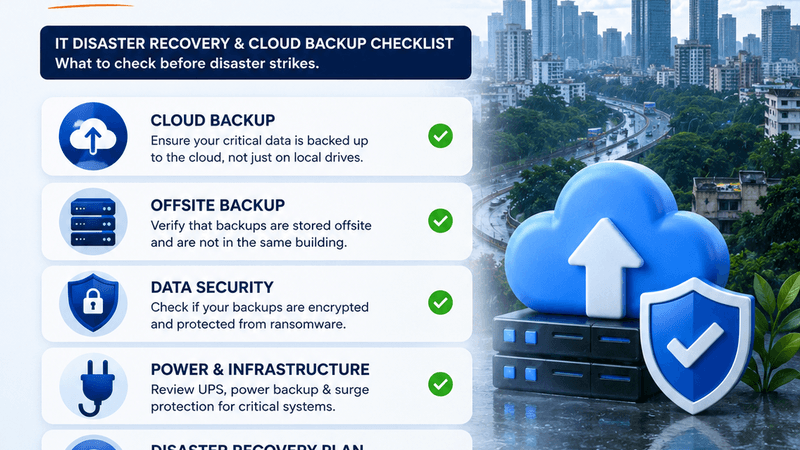
Why Monsoon Season Is Peak IT Risk Season for Mumbai Businesses
Between June and September, Mumbai and the MMR belt sees an average of 2,400 mm of rainfall. For residents that means traffic and soggy commutes. For your business it means something more expensive: unplanned IT downtime.
Indian SMEs lose an average of ₹3.2 lakh per hour during an unplanned outage. Power cuts during heavy rain, flooding in ground-floor server rooms, ISP cables going down, these are not freak incidents. They are annual events. The only question is whether your business is prepared.
This checklist covers the five things you need to do before the next downpour.
1. Move Your Backups Offsite, and Actually Test Them
The most common disaster-recovery mistake we see at ITSolvez is businesses that take backups but never test restores. A backup you have never restored is a feeling of security, not actual security.
What to check:
- Are your backups stored only on-site? If yes, a single flooding event destroys your data and your backup simultaneously.
- Do you have at least one offsite copy, cloud (AWS S3, Azure Blob, Google Cloud Storage) or a geographically separate data centre?
- When did you last do a full restore drill? This should happen every quarter, not just when something breaks.
Cloud backup is no longer expensive. For most SMEs, a properly tiered cloud backup, daily incrementals, weekly fulls, costs between ₹3,000 and ₹15,000 per month depending on data volume. That is a fraction of one hour of downtime.
2. Plan for Internet Failover
When your primary ISP cable floods or a transformer goes down, your office loses internet. For businesses running cloud-based tools (Microsoft 365, GSuite, Tally on AWS, CRM, banking portals), that means every employee stops working.
Minimum viable failover setup:
- A 4G/5G router from a different carrier than your primary ISP, configured to auto-failover. Device cost: ₹5,000–₹18,000 plus a SIM plan.
- For multi-branch offices: dedicated MPLS with a 4G backup on each branch.
- For critical operations (payments, banking): dual-ISP load balancing on a Mikrotik or Cisco router.
The key is that failover must be automatic. If someone has to manually connect a hotspot, it will not happen in time, especially if your IT person is stuck in traffic on the Western Express Highway.
3. Power Continuity Beyond a Standard UPS
A standard UPS gives you 5–15 minutes of power, enough for a graceful shutdown, not enough for continuous operations during a multi-hour power cut. Mumbai businesses in areas like Malad, Mira Road, Vasai and Navi Mumbai regularly see 4–8 hour outages during peak monsoon.
Options by budget:
- Entry (₹40k–₹1.5L): High-capacity UPS (2–4 kVA) with extended battery packs covering 2–4 hours for critical servers and networking equipment only.
- Mid (₹1.5L–₹5L): Online UPS plus a small generator for the server room. Keeps your core IT running indefinitely.
- Enterprise: Hybrid inverter system with solar and grid input, used by larger offices in areas with unreliable MSEDCL supply.
At minimum, your NAS/file server and network switch should be on a UPS that provides at least 2 hours of runtime.
4. Remote-Work Readiness: Can Your Staff Work When the Office Is Inaccessible?
The 2021 Mumbai floods demonstrated something IT teams already knew: when staff cannot reach the office, businesses that had remote-work infrastructure kept running. Those that had not set it up went silent for 2–3 days.
Your remote-work checklist:
- Can all critical-role employees access your core systems (ERP, CRM, file shares) from home via VPN or cloud access?
- Are your VPN licences sized for 100% of staff working concurrently, not just 30% as in normal times?
- Do staff know where to log in and have their credentials saved? Test this before monsoon, not during.
- Are your communication tools (Teams, Slack, WhatsApp Business) configured so managers can reach all teams without the office network?
5. Incident Communication Plan: Who Calls Whom?
Most IT disasters are worsened by the 45 minutes everyone spends calling each other trying to figure out who is handling it. A simple, written incident plan eliminates this.
Your plan needs only four things:
- A primary contact for IT incidents, internal or your managed IT provider.
- An escalation contact if the primary is unreachable.
- A WhatsApp group for IT alerts that includes all department heads.
- A brief script: "If you cannot access [system], call [number] or message [group]. Do not attempt to restart servers yourself."
At ITSolvez, all managed IT clients get a dedicated emergency WhatsApp line with a 15-minute SLA for critical incidents, precisely because monsoon outages do not wait for business hours.
The Bottom Line
None of these items require a large IT budget. Cloud backup, 4G failover, a sized UPS and a documented communication plan can be put in place for under ₹2 lakh for most Mumbai SMEs. Compare that to a single day of downtime during July or August where the average Indian SME loses ₹50,000–₹3 lakh depending on sector.
The monsoon is coming whether your IT is ready or not. The question is whether it costs you a morning or a week.